
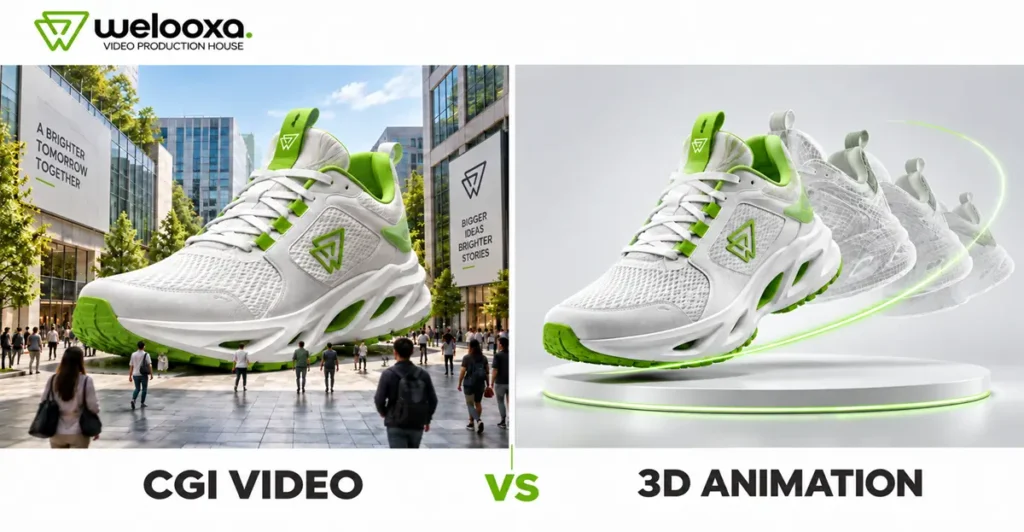
CGI video and 3D animation are closely related but not the same. CGI (computer-generated imagery) is the umbrella term for any visual created with software, from still product renders to visual effects. 3D animation is one specific type of CGI that uses movement to demonstrate, explain or tell a story. Put simply, CGI is about how something looks, while 3D animation shows how it works.
For brands, choosing between the two affects the message, the production process, the timeline and the budget. This guide explains what each format involves and how they differ. It also covers where each one works best in product marketing, what drives cost in India, and a practical framework for deciding which one your brand actually needs.
CGI and 3D Animation: What Is the Difference?
CGI means any image or video made on a computer instead of being shot with a camera. A product photo made in 3D software is CGI. A digital background in an ad is also CGI. 3D animation is a type of CGI where these computer-made objects move. So all 3D animation is CGI, but not all CGI is animated.
The work behind them is also different. For a CGI image, the team builds a 3D model, adds colour, texture and light, and creates a final picture. For 3D animation, they do all of this and then plan how each part will move, frame by frame. This extra work is why 3D animation usually takes more time and costs more.
One more thing to know: CGI does not always have to look real, and 3D animation does not always have to look like a cartoon. Both can be realistic or simple in style. So before choosing, ask two easy questions. Does your visual need to move? And how real should it look?
What Is a CGI Video?
A CGI video is a video in which some or all of the visuals are created digitally instead of being filmed. The product, the environment, the lighting and even the camera exist inside 3D software.
How CGI Differs from Camera-Recorded Footage
A traditional shoot needs a physical product, a location, lighting equipment, a crew and a camera, and every reshoot adds time and cost. In CGI production, the product is built once as a digital asset. After that, the team can change its colour or finish, place it in any setting, control every reflection and use camera angles that a real camera cannot achieve, all without organising another shoot.
CGI is widely used in advertising, product launches, social media content, visual effects and virtual production, where digital sets replace physical locations.
What Is 3D Animation?
3D animation is the process of creating three-dimensional digital models and bringing them to life through movement. Its main purpose is usually to show, explain or narrate, not only to look good.
The Core Stages of 3D Animation
A 3D animation starts with 3D modelling, where the product, part, character or environment is built digitally. Texturing then adds surface details such as metal, plastic or fabric. For anything that moves, rigging adds a control system, like a digital skeleton, so the parts move correctly. Animators then define how and when each element moves, artists set up lighting, and the scene is rendered frame by frame. Finally, compositing and post-production bring in effects, text, sound and colour correction.
How Virtual Cameras Create Depth and Movement
Inside 3D software, a virtual camera can move anywhere: through a wall, inside an engine, into a human artery or around a building from above. This camera movement gives 3D animation its sense of depth and guides the viewer’s attention to the part that matters.
CGI Video vs 3D Animation: Key Differences
| Factor | CGI Video | 3D Animation |
| Meaning | Broad category of computer-generated visuals | Specific form of CGI involving movement |
| Main purpose | Create realistic or stylised digital imagery | Explain, demonstrate or narrate through motion |
| Output | Static images, video, visual effects or digital scenes | Moving 3D objects, characters or environments |
| Best for | Product renders, advertising visuals, digital environments | Product demonstrations, explainers, simulations and storytelling |
| Production needs | Modelling, texturing, lighting, rendering, compositing, VFX | Modelling, rigging, animation, lighting, rendering |
| Script dependency | Often low for stills; moderate for CGI ads | Usually high, as the script and storyboard drive the video |
| Typical placement | E-commerce, ads, social media, packaging, launches | Websites, sales presentations, trade shows, training, YouTube |
When Should Your Brand Choose CGI Video?
CGI video or CGI product visuals are usually the better direction when your brand needs to:
1. Present a Product Before It Is Manufactured
If the product is still at the prototype stage, CGI can be created from CAD files or design references. This allows pre-launch campaigns, investor presentations and pre-orders to begin before physical units exist.
2. Show a Product in an Impossible or Highly Controlled Environment
A watch floating in space, a shoe dissolving into particles or a bottle surrounded by frozen splashes is difficult or impossible to shoot, but achievable with CGI. It is also practical when a product comes in many colour or material variants.
3. Create Photorealistic Product Visuals
For products with reflective, transparent or finely detailed surfaces, CGI gives full control over every highlight and texture. This is why luxury goods, cosmetics, electronics, automotive and furniture brands use it widely.
4. Combine Live-Action Footage with Digital Effects
Some campaigns mix filmed footage with CGI elements, such as a real person interacting with a digital product or a real street with a digitally added installation.
5. Build Reusable Digital Product Assets
Once a detailed 3D model is created, it can be reused for website images, ads, social posts, AR experiences, configurators and future campaigns. This long-term reuse is one of the strongest reasons to invest in CGI.
When Is 3D Animation the Better Choice?
3D animation is usually more suitable when the brand needs to:
1. Demonstrate How a Product Works
If buyers need to see the product in action to understand its value, motion is essential. Cutaway and exploded-view animations can also reveal internal parts such as gears, valves, circuits or fluid flow that are hidden in the real product.
2. Show an Installation or Assembly Process
Step-by-step 3D process animation can reduce confusion for customers, installers and service teams, and often works better than printed manuals.
3. Visualise Something Invisible, Microscopic or Dangerous
Airflow, heat transfer, chemical reactions, cell-level biology or equipment failure cannot be filmed safely or clearly. 3D animation makes them visible.
4. Tell a Product or Brand Story
Characters, sequences and narrative structure help audiences remember a message. 3D storytelling can guide viewers from a problem to a solution in a way static visuals cannot.
5. Compare Product Features Through Movement
Side-by-side animated comparisons, such as an old versus new design, help viewers understand differences quickly.
CGI Video vs 3D Animation for Product Marketing
The right format often depends on the industry and what the audience needs to understand before buying.
Consumer Products and E-commerce
For cosmetics, electronics, appliances and FMCG products, CGI product rendering creates clean, consistent images for e-commerce catalogues, social ads and launch teasers. 3D product animation becomes useful when a feature needs demonstrating, such as a hair dryer’s airflow technology or a smartwatch’s sensor.
Industrial Machinery
Industrial buyers usually care more about function, capacity and reliability than appearance alone. For example, a 3D animation could show how a laser cutting machine works internally, including the beam path, cutting head movement and material handling. CGI product visuals could present the same machine in a polished factory environment for brochures, trade-show displays and the website.
Software and Technology
3D motion graphics and animation help explain hardware, cloud infrastructure, data flow, IoT networks or other abstract technology concepts that are hard to show on screen.
Medical Devices
Medical and pharmaceutical brands often rely on medical 3D animation to show a device’s mechanism of action inside the body, while photorealistic CGI renders are used for packaging and product pages. Accuracy and regulatory review matter in this category, so timelines tend to be longer.
Architecture and Real Estate
3D architectural visualisation covers both still renders of exteriors, interiors and amenities, and 3D architectural animation such as walkthroughs and flythroughs. Still renders support early marketing, while walkthroughs help buyers experience scale, layout and flow.
Automotive Products
Automotive brands use photorealistic CGI to show vehicles in different colours, trims and locations. 3D animation is used to explain engine technology, safety systems, suspension behaviour or EV battery architecture.
Which Option Costs More?
There is no single answer, because both CGI video and 3D animation cover a wide range of quality levels. A simple CGI product render can cost less than a basic animation, while a photorealistic CGI commercial can cost more than a detailed explainer.
Main Cost Drivers
• Product or environment complexity: A simple bottle takes far less modelling time than a machine with hundreds of parts.
• Level of realism: Photorealistic materials, complex lighting, liquids, smoke and particles need more work and longer render times than stylised visuals.
• Number of characters or assets: Each character or unique asset adds modelling, texturing and rigging work.
• Animation length: Longer videos mean more frames to animate and render.
• Number of revisions: Changes after animation or rendering has begun are expensive.
• Voiceover, music and sound design: Professional audio adds to the budget.
• Live-action integration: Combining CGI with filmed footage requires shooting, tracking and compositing.
• Availability of CAD files: Existing engineering files can reduce modelling time, though they usually need clean-up.
CGI Video vs 3D Animation: Indicative Cost Comparison in India
| Project Type | Indicative Cost Range in India |
| CGI product render (single still image, e-commerce) | ₹2,000 – ₹5,000 per image |
| Multi-angle CGI product render set | ₹10,000 – ₹15,000 per product |
| Basic 3D animation (simple product rotations, logo or social clips) | ₹40,000 – ₹80,000 per minute |
| Mid-level 3D animation (detailed models, product demos, technical explainers) | ₹80,000 – ₹2,00,000 per minute |
| 60-second 3D product animation (typical all-in project) | ₹1,00,000 – ₹2,50,000 |
| High-end photorealistic CGI or 3D animation | ₹2,00,000 – ₹4,00,000+ per minute |
| Cinematic CGI commercial or brand film | ₹2,50,000 – ₹10,00,000+ |
Note: These are indicative market ranges compiled from publicly available Indian studio pricing guides in 2026. They are not fixed rates. Actual quotes vary with scope, studio size, freelancer vs agency, realism, deadlines, revisions, usage rights and GST.
Production Timeline and Workflow
Both CGI and 3D animation projects follow a similar production pipeline.
Typical Production Process
1. Creative brief and goal setting: Define the objective, audience, platform, duration and key message.
2. Script and concept development: Decide what the video will say and show, scene by scene.
3. Storyboard and style frames: Sketch the sequence and create sample frames to lock the visual style.
4. 3D modelling and asset creation: Build the product, parts, characters and environments.
5. Texturing, lighting and scene setup: Apply materials, set up lights and arrange camera positions.
6. Animation or CGI rendering: Animate movement and render the final frames.
7. Voiceover, sound design and compositing: Add narration, music, effects, text and colour correction.
8. Review, revisions and final delivery: Collect feedback, make agreed changes and export in the required formats.
How Long Does It Take?
As a general guide, a standard 3D product animation often takes around 3 to 6 weeks, depending on complexity and review cycles. A set of CGI product stills can be much faster, especially if CAD files are available. Complex photorealistic films, medical animations or projects with many assets can take longer. Rushed timelines are possible but usually cost more and leave less room for revisions.
How to Choose the Right Format for Your Brand
Before requesting quotes, answer these five questions.
1. Do You Need to Show Movement or Only Appearance?
If the goal is to make the product look premium and appealing, CGI visuals may be enough. If the viewer needs to see something move, open, flow or change, you need 3D animation.
2. Does the Audience Need a Technical Explanation?
B2B buyers, engineers, doctors and technical decision-makers usually need to understand function. That points towards 3D animation or a technical explainer.
3. Is the Product Physically Available to Film?
If the product does not exist yet, is too large, too small, too expensive to transport or still under design, CGI and 3D animation both solve that problem.
4. How Realistic Should the Final Visual Look?
Photorealism takes more time and budget. Stylised or semi-realistic visuals can communicate clearly at a lower cost, especially for explainers.
5. Will the Assets Be Reused in Future Campaigns?
If you plan to use the same product across ads, catalogues, website pages, AR and future launches, a high-quality 3D model can deliver long-term value.
Simple Decision Framework
| Your Priority | Recommended Format |
| Realistic visual presentation | CGI video / CGI product visuals |
| Explanation or demonstration | 3D animation |
| Storytelling or brand narrative | 3D animation (with character or story elements) |
| E-commerce catalogue imagery | CGI product rendering |
| Realistic visuals plus detailed demonstration | Both: build one 3D model and use it for stills and animation |
Common Mistakes Brands Make
1. Using CGI and 3D Animation as Interchangeable Terms
This leads to mismatched briefs and quotes. Be specific about whether you need still renders, a cinematic CGI ad, an animated demonstration or a mix.
2. Choosing a Format Before Defining the Message
Start with what the audience should understand or do after watching. A beautiful render that does not communicate a clear benefit will not help sales, so the format should follow the goal.
3. Underestimating Modelling and Rendering Time
Detailed models and photorealistic renders take time. Unrealistic deadlines often lead to compromised quality or higher costs.
4. Ignoring the Final Platform and Aspect Ratio
A 16:9 website hero video will not automatically work as a 9:16 Instagram Reel. Plan all required formats at the storyboard stage, not after rendering.
5. Failing to Plan Asset Reuse
If you do not ask for the source 3D files or future usage rights upfront, you may have to pay for modelling again later.
6. Requesting Too Many Revisions After Production Begins
Changing the script or camera angles after animation or rendering has started is one of the biggest causes of delays and budget overruns. Lock the script, storyboard and style frames early.
CGI Video or 3D Animation: Final Verdict
CGI video and 3D animation are not rivals, because 3D animation is part of the wider CGI family. The better choice depends on what your brand needs the visual to achieve. If the priority is a realistic, premium product presentation, CGI is usually the right direction. If the priority is to demonstrate, explain or narrate, 3D animation is usually more suitable. When a brand needs both, one well-built 3D model can support stills and animation together.
Before You Request Quotes
To get accurate and comparable quotes from any CGI or 3D animation studio, prepare a short creative brief that covers:
• The marketing goal, target audience and key message
• Whether you need stills, animation or both
• Video duration, required aspect ratios and publishing platforms
• Desired level of realism, with references or sample visuals
• Available product photos, drawings or CAD files
• Voiceover, music and language requirements
• Deadline, expected revision rounds and whether you need the source files
A clear brief helps studios quote the same scope, reduces revisions and makes it easier to compare options on quality and value rather than price alone.
Frequently Asked Questions
1. Can AI tools replace CGI and 3D animation?
Not fully. AI tools can quickly create concept visuals and short clips, but they often get product shape, size and small details wrong. For accurate product visuals or technical explanations, brands still rely on proper 3D modelling. AI is mostly used alongside it to speed up ideas and early drafts.
2. Is CGI cheaper than a traditional product photoshoot?
For a single simple product, a photoshoot can cost less. CGI becomes more cost-effective when a product comes in many colours or variants, when it is not yet manufactured, or when the same visuals will be reused across many campaigns.
3. What is the ideal length for a 3D product animation?
It depends on where the video will be used. Social media ads usually work best at 15 to 30 seconds. Product pages and website videos often run 60 to 90 seconds. Detailed technical or training videos can be longer.
4. Can a 3D animation be updated if the product changes later?
Yes. Since the product already exists as a 3D model, the studio can update its design, colour or parts and re-render the scenes. This is usually faster and cheaper than making a new video from scratch.
5. Is 3D animation better than 2D animation?
Neither is better in every case. 2D animation is simpler, faster and more budget-friendly for explaining ideas, services or software. 3D animation is the better choice when you need to show a physical product, its depth or its internal parts from different angles.